The Zelda 3 Practice Hack is the principal tool for anyone wanting to practice, understand, or explore the original game and its mechanics beyond the casual level.
Feature requests, bug reports, and general discussion can be had in the #practice-hack channel of the ALTTP Discord server.
Download
Latest (SA-1)
This version should be used by any system that can properly emulate the SA-1 with 256kb of BWRAM.
Compatible systems:
- SD2SNES / FXPak
- Mesen-S
- higan/bsnes v115+
- bsnes+
- snes9x 1.6+
- faust
- MiSTer
Randomizer (SA-1)
This version is slightly modified from the main version to include several randomizer features:
- Major items are replaced with E (toggleable)
- No item text
- No crystal cutscenes
- Bottle submenu is accessed with X, instead of automatically
- Pressing Y on a bottle in the menu will select the next bottle
- Quick swap (DISGUSTING!)
- Hammerable Ganon
- FastROM toggle
v13.6.0 (Old)
This is a snapshot of the pre-SA-1 practice hack. It will no longer be updated and only serves as a fallback for incompatible systems.
List of shame
- Everdrive
- SuperNT jailbreak
- BizHawk's old bsnes core (v85)
- SNES Classic (This entire console is utter garbage)
Using the hack
The practice hack comes loaded with a full suite of HUD changes, shortcuts, and functions to facilitate RTA practice and glitch hunting. The most commonly used features include:
- Presets to load a specific section of the run with the appropriate equipment.
- Built-in save states for practicing anything repeatedly.
- Timers for comparing strategies and execution against yourself and others.
- Input display for displaying your inputs on your display.
Configuration settings will persist across practice hack versions if newly downloaded hacks are given the same file name as previous versions on whatever system you use.
Practice Hack Menu
The practice hack menu can be accessed by having the R and Start buttons held down together on the same frame. This menu and other shortcuts can be activated during most gameplay modes, but will be prohibited during some modules (such as the file select menu). When disallowed, shortcut bindings will play a beep and resume normal action.
Menu controls
| Button | When | Action |
|---|---|---|
| R+Start | Game play | Open practice menu |
| Start | In practice menu | Close practice menu |
| Select | In practice menu | Return to main index |
| A | Submenu option | Open submenu |
| Command option | Activate command | |
| X | Most options | Clear / Disable |
| Numfields | Set to minimum | |
| Y | Most options | Enable |
| Numfields | Set to maximum | |
| B | Main menu | Move to top |
| Submenu | Return to previous menu | |
| L / R | Num field | Increment/Decrement by larger amounts; no wrapping |
| ⏴ / ⏵ | Toggle option | Toggle item |
| List option | Previous/Next selection | |
| Num field | Increment/Decrement by 1 | |
| ⏶ / ⏷ | Practice menu | Move cursor |
Menu legend
| Icon | Meaning |
|---|---|
| Opens a submenu | |
| Runs an immediate command | |
| Toggles a binary option | |
| Sets from a selection of choices | |
| Sets a numerical value | |
| Loads a preset | |
| Sets a shortcut binding | |
| Opens a submenu for selection | |
| Displays information |
Concerns
Related pages
How accurate is lag compared to the vanilla game?
As of version 14, very; about 2% of a scanline off. Here's a quick rundown of how it works:
SA-1
The SA-1 is a coprocessor that can be used alongside the main SNES CPU. It can run code faster, but, more importantly, it can run at the same time as the SNES CPU without slowing it down. This allows the practice hack to handle certain features with minimal lag change from vanilla. Due to the limitations on memory access, not every feature can be handled lag-free on the SA-1.
Implementation
There are specific routines that get run at the beginning and end of every frame to manage the OAM buffer. These routine aren't coded very efficiently. The practice hack heavily optimizes these routines to allow more CPU time for all of its extra features. Early in the frame, the SNES CPU sends a request to the SA-1 for it to process controller input for shortcuts. If a shortcut is found, a vector pointing to its routine in ROM will be saved in memory. The next frame, the SNES will check for this vector, and respond accordingly.
For the game HUD, most of its code has been modified to write to memory that is visible to both CPUs. Once the HUD's buffer has been modified by the SNES, it copies a handful of variables into memory that is visible to both the SNES and the SA-1. This is where most of the time saved with OAM optimization is accounted for. After these variables are copied, the SNES sends another interrupt request to the SA-1 to indicate that the coprocessor can do its own changes to the tilemap before it gets drawn to the screen. Some features (such as the hearts) are still written to their original WRAM buffer. This way, they can contribute their normal CPU load without ruining the HUD.
Troubleshooting
- Most game crashes should be caught be a special interrupt handler and result in a blue screen of death. If you believe the crash was caused by a bug specific to the practice hack, please report it in the practice hack channel of the ALTTP Discord.
- If the SA-1 crashes, it will begin printing ⚠ characters on the HUD under the resource counters.
- Holding Start and Select during power on will reset all configurations to their defaults. When you do this, you will hear Link screaming as he falls to his death.
- If something in the menu goes out of range, you will be warned with "BAD VAL". Press X to clear it.
Features list
Main menu
- Presets
- Built in states for various categories
- Items
- Modify Y-item loadout
- Equipment
- Modify A-items, combat items, health, and keys
- Game state
- Modify game progress, status, and mode
- Link state
- Modify player character attributes
- Gameplay
- Feature toggles related to gameplay
- RNG control
- Fix specific RNG calls to specific values
- HUD extras
- Toggle features that appear on the HUD
- Lite states
- Custom presets
- Room master
- Load rooms and view/edit room flags
- Shortcuts
- Modify shortcuts for quick feature access
- Preset config
- Controls how presets load
- Configuration
- Configuration toggles related to meta-operation
Presets
Scene presets that can be loaded to practice various parts of various runs. The category listed can be changed in the preset config menu.
If a category you want to practice does not have presets, you can help by making them. Instructions for doing so are outlined here.
Items
- Bow
-
- No
- Normal
- Silver
- Boom
-
- No
- Blue
- Red
- Hookshot
- Yes/No
- Bombs
- 0—{10—30}
- Powder
-
- No
- Mushroom
- Powder
- Fire rod
- Yes/No
- Ice rod
- Yes/No
- Bombos
- Yes/No
- Ether
- Yes/No
- Quake
- Yes/No
- Lantern
- Yes/No
- Hammer
- Yes/No
- Flute
-
- No
- Shovel
- Inactive flute
- Active flute
- Net
- Yes/No
- Book
- Yes/No
- Bottles
-
For each bottle (1—4):
- No
- Unobtainable shroooom
- Empty
- Red potion
- Green potion
- Blue potion
- Fairy
- Bee
- Good bee
- Somaria
- Yes/No
- Byrna
- Yes/No
- Cape
- Yes/No
- Mirror
- Yes/No
Equipment
- Health
- Current health. Fractional hearts are indicated with a bar.
- Max HP
- Max health in hearts.
- Magic
- Set magic points.
- Rupees
- 0—999
- Fill everything
- Grants full equipment with just below max health and magic.
- Sword
-
- No
- Fighter
- Master
- Tempered
- Gold
- Shield
-
- No
- Fighter
- Red
- Mirror
- Armor
-
- Green jerkin
- Blue
- Red
- Gloves
-
- No
- Power glove
- Titan's mitts
- Boots
- Yes/No
- Flippers
- Yes/No
- Moon pearl
- Yes/No
- Half magic
- Yes/No
- Heart pieces
- 0—3
- Bombs
- 0—{10—30}
- Arrows
- 0—{30—50}
- Bomb capacity
- 10—30
- Arrow capacity
- 30—50
- Keys
- 0—9
- Big keys
- Toggle big keys for each dungeon.
- Small keys
- Key counts for each dungeon.
Game state
- Skip text
- Skips the current text box.
- Remove sprites
- Removes all sprites, overlords, and ancillae from the screen.
- Reset dungeons
- Resets every room associated with a specific dungeon (including all non-dungeon rooms as a single group) following these rules:
- Quadrants visited
- Keys collected
- Chests opened
- Doors opened
- Moving walls
- Water level
- Boss defeated
- Heart collected
- Rupee tiles collected
- Toggle bosses defeated
- Modifies the boss defeated room flag for the specific boss's room.
The Agahnim 1 flag will also toggle the lumberjacks overlay and can enable the castle gate overlay, and the Agahnim 2 flag will also toggle the pyramid hole overlay. - Pendants and crystals
- Toggle collection status of each dungeon prize.
- Game flags
- Toggles miscellaneous SRAM flags:
- Uncle dead
- Talking to uncle in the secret passage
- Sanc priest
- Talking to the priest after mastersword
- Escaped
- Returning Zelda to Sanctuary (also toggles castle gate overlay)
- Hobo bottle
- Got bottle from hobo
- Vendor bottle
- Bought bottle in Kakariko
- Stumpy
- Stumpy turned into a tree
- Purple chest
- Unlocked purple chest
- Smithy rescued
- Saved the frog
- Tempering
- Smiths currently have your sword for tempering
- Drops
- Submenu for controlling drop luck, rupee pulls, and prize packs.
- Drop luck
- Pond of Happiness luck: Normal (50%), Great (100%), Trouble (0%)
Note that this option is distinct from the RNG control option and will take precedence. - Lucky kills
- Number of kills done under drop luck.
- Rupee pull kills
- Number of kills counted since last rupee pull
- Rupee pull hits
- Number of hits taken since last rupee pull
- Prize pack [1-7]
- Current position in the given prize pack
- Follower
-
- None
- Zelda
- Garbage
- Trash
- Old man
- Zelda Text
- Blind
- Frog
- Dwarf
- Sign man
- Kiki
- ??????
- Purple chest
- Super bomb
- Sasha text
- World
- Switch between Light World and Dark World. Does not change screen ID.
- Progress
- Game mode selector:
- Started
- No progress. Game will not save.
- Uncle
- Sword and shield obtained from uncle.
- Zelda
- Zelda has been rescued.
- Agahnim
- Agahnim has been defeated.
- M16 cache index
- Sets
$04AC . Press A to apply.- Base
- Reset the buffer
- Tile props
- Shortly before tile properties at
$7EFE00 - Damage table
- Shortly before enemy subclass damage table at
$7F6000 - Messages
- Shortly before message pointers at
$7F71C0
Link state
- Waterwalk
- Control the falling-in-pit address
- Unarmed
- 0; Link's default state
- Armed
- 1; armed as if waterwalk were set up by dashing from a pit
- Armed (2)
- 2; intermediate state that is difficult (if not impossible) to obtain outside of actually falling
- Deathholed
- 3; falling state obtained after a death hole in the underworld
- Statue drag
- Toggles the fake statue address.
- Ancilla index
- Set ancilla search index ($03C4); $00—$7F
- Spooky
- Set ancilla slot 4 altitude
- Armed EG
- Yes/No
- EG strength
-
- EG 0
- Strong
- Weak
- Activate superbunny
- Sets Link's general state handler to default (
$00). For safety, this will only run when Link's handler is currently set to bunny ($17). If successful, you should hear a poof; otherwise, you will hear a beep. - Activate Lonk
-
Sets Link's general state handler to bunny (
$17). For safety, this will only run when Link's handler is at its default value ($00). If successful, you should hear OOF; otherwise, you will hear a beep.Despite their labels, the Superbunny and Lonk menu options can be used to return to normal Link and normal bunny, respectively.
- Finish mirrordoor
- Sets the mirror door wait timer to finish after 11 frames. For safety reasons, this will only run when the Triforce door submodule is in effect. If successful, you should hear a VOOMP; otherwise, you will hear a beep.
- Create portal
- If Link is the Light World and not a special area, this will create a mirror portal at his feet. Link will also be given iframes to avoid an instant warp. When disallowed, you will hear a beep.
Gameplay
- Skip Triforce
- Transitioning north from Ganon's Room will behave like a normal screen transition, allowing consistent and reliable room times for the fight.
- Disable beams
- The Master Sword and its upgrades will no longer fire sword beams at full health.
- Lit rooms
- Dark rooms will be at full brightness and visibility. Retains a faded lamp cone for cues.
- Fast walls
- Speeds up the moving wall cutscenes.
- Visible probes
- Search probes used by guards, beamos, etc. will display a graphic. NOTE: Drawing probe sprites requires slightly more work for the CPU than can be accounted for and thus may effect lag frames where they would otherwise not occur, especially in crowded areas with many guards.
- Show STC pits
- Automatically mark all pits after performing somaria door corruptions.
- Disable BG1
- Disable BG2
- Disables SNES background 1 or 2, respectively, via PPU registers. Has no effect on lag.
- OoB Mode
- Turns on the debug OoB mode, which has the following features:
- Link ignores all collision and can walk everywhere.
- The mirror now works to also go from Light World to Dark World.
RNG Control
- Prize packs
- Modifies drop percentages. This option only affects prize packs from a normal random roll, not other guaranteed drops such as the stun drop or keys. Drop luck from the Pond of Happiness will override this setting.
- Vanilla
- Drops behave normally. 50% for most prize packs.
- Always
- All enemies drop their prize packs when possible.
- Never
- No enemy drops prize packs, except the 100% chance pack 4.
- Frame rule
- Forces the frame counter to a specific value on preset or savestate load.
- Pokeys
- Random, fixed RNG for every combination of UD/LR for each pokey
- Agahnim
-
- Random
- Yellow
- Blue
- Helmasaur
-
- Random
- No fireball
- Fireball
- Ganon warps
-
- Random
- No warp
- Warp
- Ganon warp to
-
- Random
- Far left
- Bottom left
- Bottom right
- Far right
- Eyegore walk
-
- Random
- Short
- Medium
- Long
- Arrghus walk
-
- Random
- Shortest
- Short
- Medium
- Long
- Longest
- Turtle walk
- Random, 32 fixed RNGs
- Lanmola exit
- Random, fixed {X,Y} for 0≤X≤7; 0≤Y≤7
- Moth conveyor
-
- Random
- Right
- Left
- Up
- Down
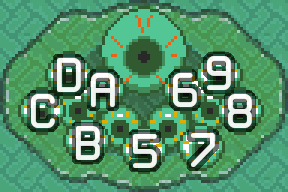
- First Vitty
-
- Random
- Slot 5
- Slot 6
- Slot 7
- Slot 8
- Slot 9
- Slot A
- Slot B
- Slot C
- Slot D
HUD extras
- Health display
- How to show Link's current and max health:
- Numerical
- Classic practice hack display under rupee count
- Vanilla
- Vanilla graphical display NOTICE: vanilla hearts will be drawn to the HUD first; additional HUD features will be drawn over them.
- Input display
- Visual indication of every button registered each frame.
- Off
- Disabled.
- Graphical
- Rectangle buttons arranged like a controller.
- Classic
- Original character display used by older hacks.
- Classic Gray
- Classic with unpressed buttons in gray.
- Sentry [1—5]
- Line [1—4]
- 5 sentry slots and 4 line sentries displayed on the HUD. See here for a list of all sentries. NOTE: Line sentries require slightly more work for the CPU than can be accounted for and thus may effect lag frames where they would otherwise not occur. NOTE: Lines 3 and 4 will cover part of the text box when it is in the higher position. The select menu, however, will cover lines.
- Hide lines
- Removes the line sentries from the HUD without the need to disable them.
- HUD spinner
- Animated spinning icon that indicates the SA1 is running. Can also be used to see when HUD lag is relevant.
- State icons
- Displays icons along the left side of the HUD for the following properties (top to bottom): superspeed, waterwalk, door state, stair drag.
- Quick warp
- Displays an icon on the HUD when the current camera will effect a quickwarp.
- Boss cycles
- Displays the cycle count of bosses.
Lite states
16 custom presets that can be saved, loaded, and erased.
- To load a lite state, press A.
- To write a lite state, hold Y for 60 frames. This will create a preset at your current location with your current equipment.
- To delete a lite state, hold X for 60 frames.
Room master
- Set room
- Change the current room loaded and viewed.
- Load selected room
- Loads the currently selected room based on the configurable settings. Tries to be systematic and intelligent about positioning, camera, etc.
- Configure loading
- Configure settings that control what state rooms are loaded in.
- Open shutters
- Opens all shutter doors in the loaded room.
- Kill sprites
- Kills all sprites in the loaded room.
- Peg state
- Choose the peg state when loading rooms, or leave them in their current state.
- World state
- Choose the world ID, let it take on the expected value of the room, or leave it as is.
- Dungeon ID
- Choose the dungeon ID, let it take on the expected value of the room, or leave it as is.
- Door 0, …
- View and change the various flags saved per room.
Shortcuts
- LTTPHack menu
- R+Start - Opens the practice hack menu. NOTE: this shortcut cannot be changed.
- Load last preset
- Reloads the most recent preset or litestate used from the menu.
- Save state
- Saves current state of the game, similar to emulator savestates.
- Load state
- Loads saved savestates, similar to emulator savestates.
- Reset seg timer
- Resets the segment timer, which is not automatically reset like room timer.
- Toggle OoB
- Turns on out-of-bounds mode.
- Skip text
- Skips the current text box.
- Remove sprites
- Removes all sprites, overlords, and ancillae from the screen.
- Toggle switch
- Flips the crystal switch color in underworld.
- Fill everything
- Maxes out equipment, rupees, items, and health.
- VRAM repair
- Fixes important registers and VRAM data that have been corrupted by door glitches.WARNING: If this shortcut is triggered during a text box, the text box will disappear, but the game will remain in text mode.NOTE: this feature only repairs registers and VRAM; other areas of RAM may result in game crashes unrelated to this feature, but which are never normally encountered in vanilla runs.
- Mark all pits
- Modifies the upper layer tilemap to mark pits.NOTE: this feature is intended for finding pits created by overlay corruption, but it will mark all standard pit tiles the same way.
Preset config
- Preset category
- Changes the run category listed in the presets submenu.
- Safeties
- Opens a new submenu with safety options for the currently selected category.
- Death reload
- Reloads the last preset upon death.
- Random bats
- Randomize the variable that Ganon uses to spawn bats after loading a preset.
- Use preset load
- Choose what inventory to use when loading a preset or lite state.
- From preset
- Uses the loadout defined in the preset.
- Current
- Uses your current equipment.
- Custom [1—8]
- Uses the custom loadout selected.
- Manage loadout
- View and manage saved loadouts. Press A to save current equipment to selected slot; press Y to load.
Configuration
- System and ROM
- Submenu with diagnostic information
- Rerandomize
- When using built-in savestates and presets, this will run the RNG function to create a new value on each load. It will also randomize the frame counter.
- Music
- Sets the ADSR envelope of every instrument used by music to 0 (except the saw used by mirror warps). Nothing else changes, so this feature does not affect lag.
- Menu open
- Select whether the practice menu opens up to where you left off or resets to the top.
- HUD font
- Change the font used by HUD extras. This will not change the font for the vanilla HUD or for the HP display. Hover over options for larger preview.
- LTTP
- Klonoa
- TI-83
- Shin-chan
- SMT (Shin Megami Tensei)
- Mario World
- DKC (Donkey Kong Country)
- ZAMN (Zombies Ate My Neighbors)
- Emerald (Pokémon Emerald)
- Earthbound
- FF6 (Final Fantasy VI)
- Lufia 2
- Goonies 2
- Pac-Man (Pac-Man Arrangement)
- DOOM (GBA version)
- Undertale
- Pocky (and Rocky 2)
- Skyroads
- Yoshi's (Island)
- S. Metroid (Super Metroid)
- NES Open
- Black Bass (Super Black Bass 3)
- Loopz
- Color config
- Personalization of the practice menu colors. The following preset colors are available:
- 000000Black
- F8F8F8White
- C06000Brown
- A8A8A8Gray
- C00000Red
- E0A800Yellow
- 20C028Green
- 4870D0Blue
- C8C8F8Periwinkle
- 000090Dark Blue
- 06A969Lui green
- 20A8F8Glan blue fantasy
- F8B000Orange
- 782878Purple
- 605800Garbage
- 8090A0Blilver
- F858A8Pink
- F76D61Peach42
- 2AA8D9Siriusly?
- B8D850Chartreuse
- FFBFFFBlunt pink
- 78886AIgarashi Futaba